
v1.0.0: Commercial & Industrial sites
 Nicolas Höning
Version v1.0.0 of FlexMeasures is a big milestone 🎉 - for one, it contains a little more than 100 PRs and adds huge abilities to schedule industry assets! Second, we decided that FlexMeasures is now mature enough to rip off the band-aid and move to major versions.
See the changelog for a complete list of improvements. Here, we cannot talk about everything that happened. But we will talk about:
- Modelling Commercial & Industrial sites
- Reduce some modeling friction
- More agent-friendly Job API
- Faster charts
- Rate limiting / plans for accounts
- Creating new sites from templates
- Storing encrypted secrets & tokens
Modelling commercial & Industrial sites
A lot of our work had been centered around batteries, EVs and heat pumps - the prime flexible assets during electrification. In current projects, use cases with more complexity kept popping up, like assets with more than output (like CHPs), e-boiler vs. heat pump, heat storage with (inputs from both of these), multiple energy carriers (like electricity and gas) and local switch-boarding (e.g. all EV chargers on a separate group, multiple buildings with each their own connection capacity).
This happens even in single households (think of an hybrid heat pump, as an example), but mostly this is what Commercial & Industrial (C&I) sites demand.
Version 1.0 added all these modeling capabilities:
- Intermediate power constraints
- Multi-commodity support (new
commodityfield in the flex-model) - Shared storage with multiple inputs (multi-feed stock, by devices each referencing the same sensor as
state-of-chargein the flex-model) - Operation-mode power bands (devices that van be off of operate within a limited range), using an
operations-modefield in the flex-model. - Commitments in UI - flex-context editing for commitments was possible, but not yet via the UI.
We added some tutorials to help you grasp these concepts, like one for multi-commodity and one for multi-feed stock.
Much of this required re-modeling the scheduler formulation itself, see this PR on supporting device groups, and note that under some of these settings, FlexMeasures now runs a MILP problem, not just LP (raising the requirements for the underlying solver).
Remove some modeling friction
We had several feedback sessions with engineers from partners, who were modeling optimization problems in FlexMeasures. Incorporating this valuable feedback helps us improve the user experience in this important onboarding moment, and we did a few already in v0.33. We hope to do many more of these, so let us know what is still confusing
- 2041: Make flex-config more explicit about production vs consumption. Users got confused in modelling, where clarity helps. What we did: Migrate
sensorfield on flex-model toconsumption: {"sensor": x}orproduction: {"sensor": x, Expand the documentation section on power sign convention , Migrateinflexible-device-sensorstoinflexible-consumptionandinflexible-productionon flex-contex - 2222: Power capacity is not mandatory. If either
consumption-capacityandproduction-capacityare used, we are fine. - 2146: Imprecise datetimes are floored on ingestion. FlexMeasures should be more robust when datetimes are slightly off the expected sensor clock, such as
10:00:40instead of10:00:00. 2194 also does this for SoC projections like SoC targets.
More agent-friendly Job API
One thing that helps AI agents to use a technology is a clean API. We noticed that in FlexMeasures, triggering a forecasting job nicely returns a HTTP status 202 (that status indicates that an order has been accepted, but the work is still going on), but triggering scheduling returned 200 (basically saying the work is done), plus a schedule ID to look up.
This is not up to par and not consistent. So, now all triggering API endpoints will return the 202 status, whether you triggered forecasting or scheduling work. The response will consistently name the job ID the same way. It also applies to newer triggered jobs, like data ingestion and reporting.
Also, for inspection of results, the relatively new endpoint GET /api/v3_0/jobs/<uuid> now is more useful and compliant, too ― it returns 202 while the job is queued/running, 422 if it failed, and 200 only once it is finished (previously always 200).
Inspection of scheduling results is rather important, and not only on the API but also locally or on the server- So result inspection got better docs and a CLI command fexmeasures jobs inspect-job.
Faster charts
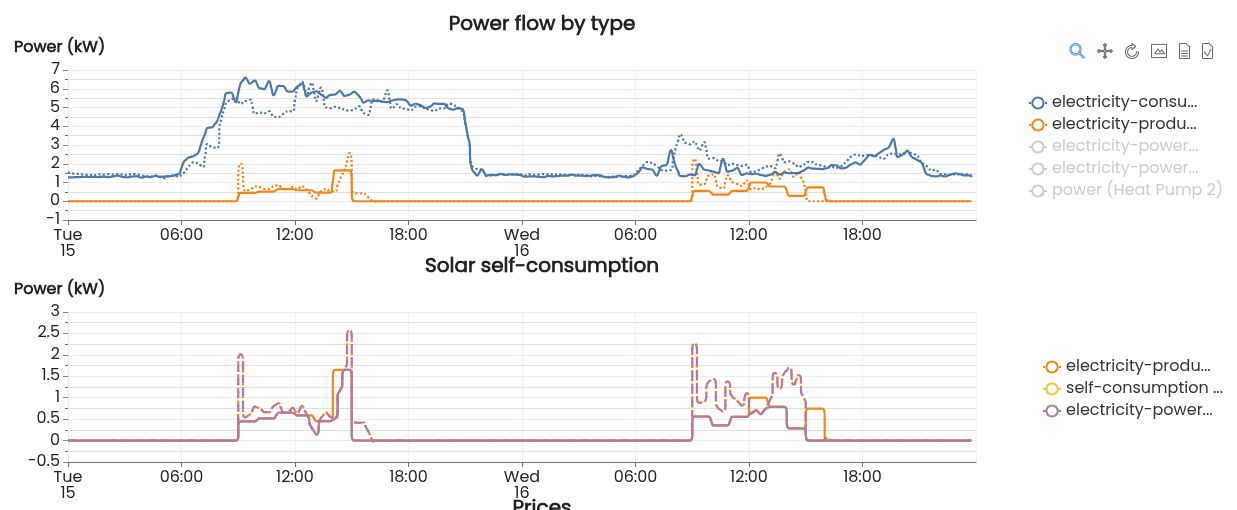
The charts in FlexMeasures have changed to the Apache ECharts library, which renders noticably faster.
They are noticeably snappier and more interactive than the previous library (Vega-Lite), allow zooming/panning, and now we finally have togglable legends!
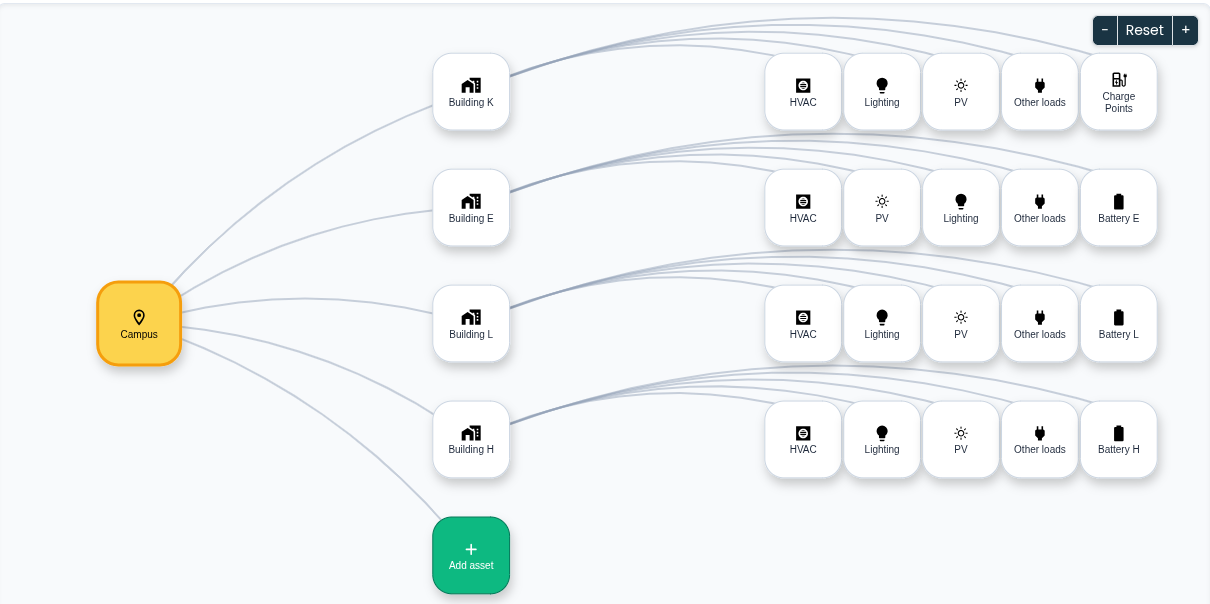
Another visual improvement using ECharts has been to show a better site structure on the context page - nicer styling, better zooming and panning.
Rate limiting / plans for accounts
For scaling the usage of FlexMeasures as a robust and multi-tenant platform, we cannot really allow all users to trigger as many CPU-demanding scheduling jobs as they want to. They could bring the platform down (depending on how many CPUs you -as the host- assign to these job queues).
This actually is something we need to take care of before users use LLM agents to interact with a FlexMeasures platform - it can easily get out of hand quickly.
This also applies to other high-CPU jobs like forecasting and reporting. Since PR 2306, The FlexMeasures API is now rate-limiting all endpoints with a default plan per account ("500 per minute"), and these heavy-duty endpoints in particular with a lower limit ("10 per 5 minutes"). When an account has hit the limit, the HTTP status 429 is returned.
These default plans are editable in config settings and you can choose to set RATELIMIT_ENABLED to False to stop all rate limiting. It also doesn't apply in simulations, when FLEXMEASURES_MODE is set to play.
And: we started work on the ability for hosts to define their own plans, so for instance you can now already create different tiers, like starter and premium accounts, and assign accounts to them.
Creating new sites from templates
Let's say your customers have multiple sites with the same design - same devices, similar situation. When you have figured out in your pilot how to forecast & optimize this setup, you want to repeat it. At scale, if possible.
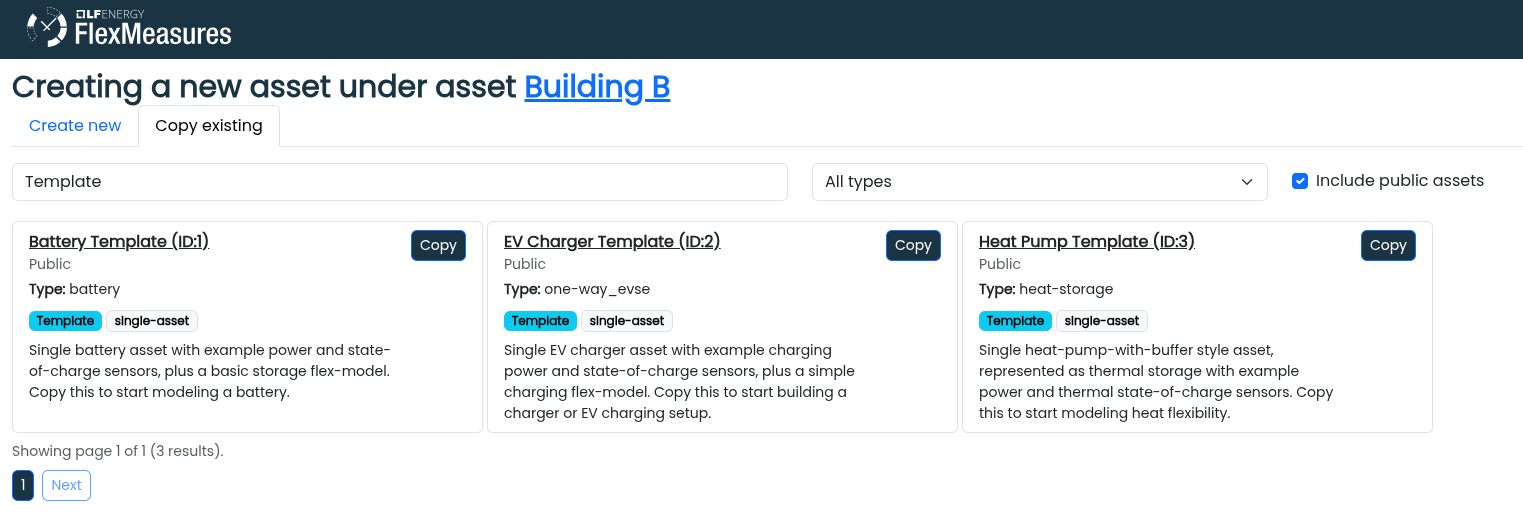
In FlexMeasures, you can copy a whole asset (e.g. a site asset with sub-assets, plus sensor and flex-config setup), already since v0.33. In v1.0 we also add UI support for this in the asset creation dialogue. Search for an asset, copy it - you might be 95% done to get a new site online!
Storing encrypted secrets & tokens
A final feature we want to mention is somewhat under the hood. But for authors of FlexMeasures plugins, it can be important.
Many plugins are about integrations with other platforms. For energy prices, for weather forecasts, to DSOs - you name it. And these days, getting cyber-security right is paramount.
Until now, you would store an access token or password in the FlexMeasures config file. That works. Here are a few reason it falls short:
- Cybersecurity: You are potentially exposing too many secrets.
- It doesn't scale, if you are integrating using not just your own account, but one per client. For instance, when you integrate with the smart gateways that your customers buy and authorize with separately.
- The modern workflow of using passwords only to get access tokens, and even storing refresh tokens for periodical renewal of these access tokens also is not possible.
FlexMeasures v1.0 (since PR 2236) allows to store secrets on account and asset level and provides logic to perform token renewal dances of various kinds (because most platform operators have their own ways).
Interested? Start with the docs.