v0.30: Forecasting revamped
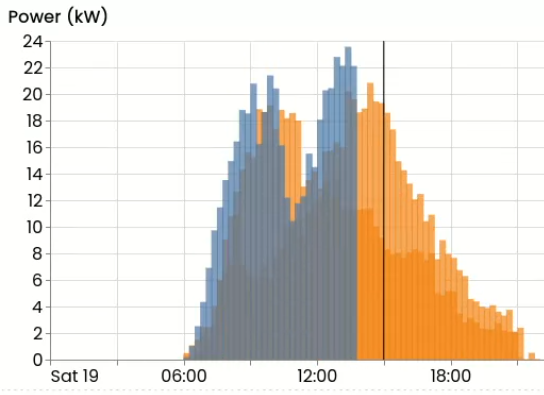
Version v0.30 of FlexMeasures revamps forecasting - in short, we now support fixed- viewpoint forecasting, which is much better suited to real-life usage than the previous implementation, and use more modern tooling.
Three other notable features:
- Expose prior commitments as part of the flex-model (and costs for schedules deviating from them) ― a powerful modeling feature
- Two big improvements in documentation: Flex-config fields and a new tutorial
- Consultants can now see client assets on dashboard ― supporting these kind of users is good for a scaled, multi-tenant platform.
Plus, as always, a lot of small tweaks have happened! See the changelog for a complete list of improvements.
Fixed view-point forecasting
Forecasting is crucial to FlexMeasures' main purpose (which is scheduling). We need to have an idea about energy consumption in the near future, so we can plan it.
There was a way for doing that in FlexMeasures, but we rewrote that completely.
The biggest change is that we went from rolling-viewpoint forecasting to fixed-viewpoint forecasting.
Before, when we made forecasts for some time range (e.g. covering 24 hours), each prediction covered the same relative forecast horizon. So, let's say we made 24 forecasts, and each one had a six-hour horizon - basically this represents a simulation of moving an hour at a time and making one forecast each time, for six hours ahead.
More realistic for simulations, but also much more usable in real-time scenarios, is to make multiple forecasts each time. So, for one fixed view point (e.g. now), we make several forecasts, maybe even 24, covering each hour of the time period. We'd overwrite each existing forecasts with the most recent (and most likely more accurate forecast).
Weather forecasts services are already delivered like that - you ask their API for a forecast, and you get 24 hourly forecasts― the best for each hour that are known right now. The forecast for one hour from now will be highly accurate, and the one for 22 hours from now less so. Forecasts always get much more accurate the smaller the forecasting horizon becomes. However, having a forecast with a 22-hour horizon is nice to have for a planning platform like FlexMeasures, much better than having none.
We also improved on periodic re-training, so even in larger forecasting jobs, covering longer time windows, we can keep accuracy high.
Also, the forecasts work out-of-the box as historic forecasts (with some in-built support for columns like time of day or day of the week and year), but we made it straightforward to add more regressors - basically sensors where valuable information is stored (like forecasted outdoor temperatures).
Finally, we updated which underlying models are used. We use an LGBM model via Darts, but it is also easy to use others.
The new forecasting is now available as CLI command (flexmeasures add forecasts), but we are also building an API endpoint for triggering forecasts.
Read more in the docs. This work was done in Pull Request 1546 (the lower PR ID tells you this has been long cooking), and more are following.
Commitments
The flex-context in FlexMeasures can include prior commitments. One example of a prior commitment might be how a large consumer buys a profile on the day-ahead market and wants FlexMeasures to compute schedules that stay close to that profile (to avoid imbalance prices).
Each commitment has a baseline value (which can also be a sensor, i.e. a profile), and can have prices for deviating up- or downwards (which are applied inside the optimization problem to steer the schedule).
Here is an example to see how it looks like with one commitment:
{
  "flex_context":
  {
    "commitments":
    [
      {
        "baseline": "400 kW",
        "up-price": "304 EUR/MWh",
        "down-price": "530 EUR/MWh",
      }
    ]
  }
}
So this says we committed to using 400 kW consistently (this could also be a time series, like a sensor or time blocks). And deviating from that has certain costs for the scheduler to take into consideration.
Actually, prior commitments have been part of the scheduler for some time, and we use them as a generic way to encode capacity limits as soft constraints. Soft constraints do not break the scheduler if they are breached, which returns a zero-schedule (which happens with hard constraints). Also, this allows us to stack several such commitments or constraints into one problem in a generic way.
So until now commitments basically were some "magic", happening when a user selected a few certain flex-context fields. Now they are also usable for anything one might build.
Other ideas:
- PPAs (baseline is the agreed consumption or production, prices denote prices if it is not met)
- modeling savings in gas usage (baseline is 0, meaning gas is used to satisfy all heat demand - every deviation is a good thing, as electricity replaced some heat. Upward price models the actual price of gas)
- Nudging to lower CO₂ intensity (the main objective might remain to optimize electricity prices, but a commitment can model a penalty on CO₂ - either CO₂ taxes explicitly, or an internal weight)
We still have to support them in the UI, but the principle is there, and can be quite powerful. This work was done in Pull Request 1754 and 1793.
Documentation
We take documentation seriously, as the key ingredient to building an eco-system around a project.
We spent considerable effort in improving this, again.
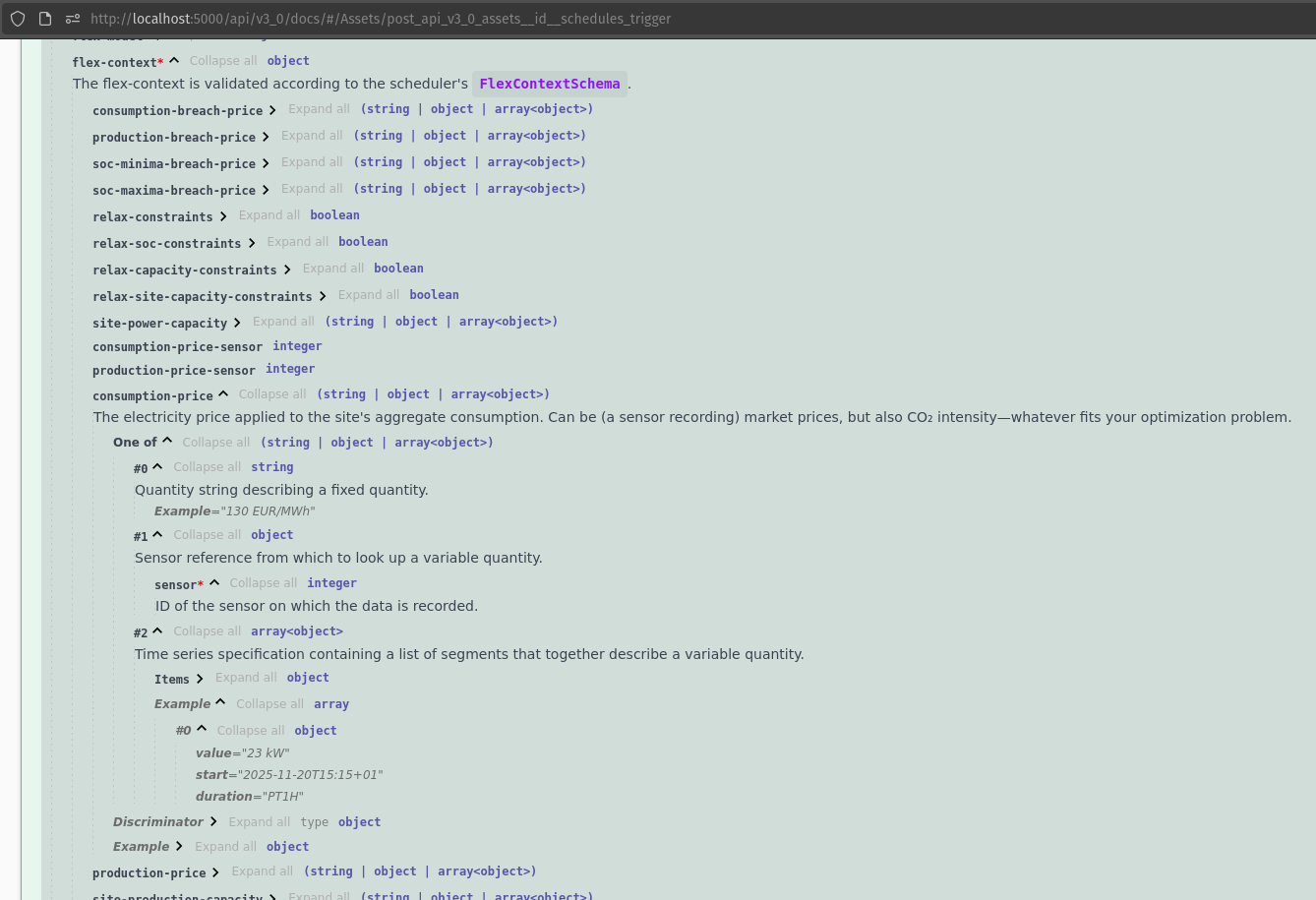
First, the flex configuration is the key ingredient to building many distinct smart energy services using FlexMeasures. We improved the documentation of each field in flex-context and flex-model, and we made sure this is replicated in 3 places: ReadTheDocs, SwaggerDocs and the UI dialogues where you can set fields.
Now there is unprecented wealth of customization knowledge at your fingertips. the picture below from SwaggerDocs, I only opened the schema information about the consumption price setting in the flex-context (available in the docs of the schedule-triggering API endpoint):
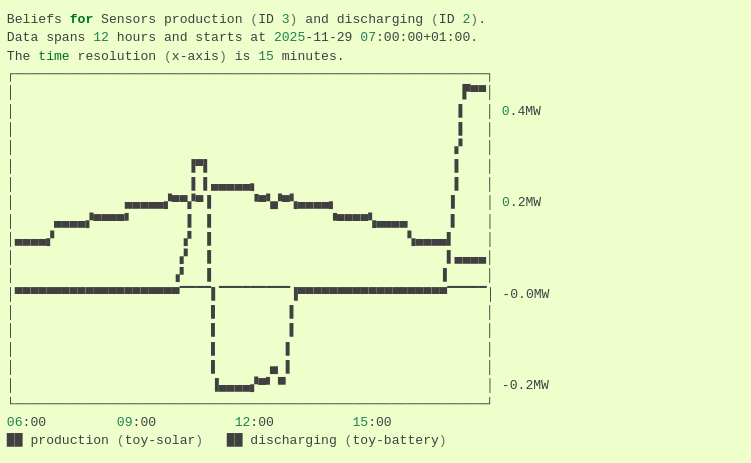
Second, we added a new tutorial: "PV curtailment and Multi-asset scheduling". It explains how to add a new type of flexible asset (curtailable PV), in combination with a battery, as well.
Here is one of the graphs, as shown in the CLI:
Improved dashboard for consultants and clients
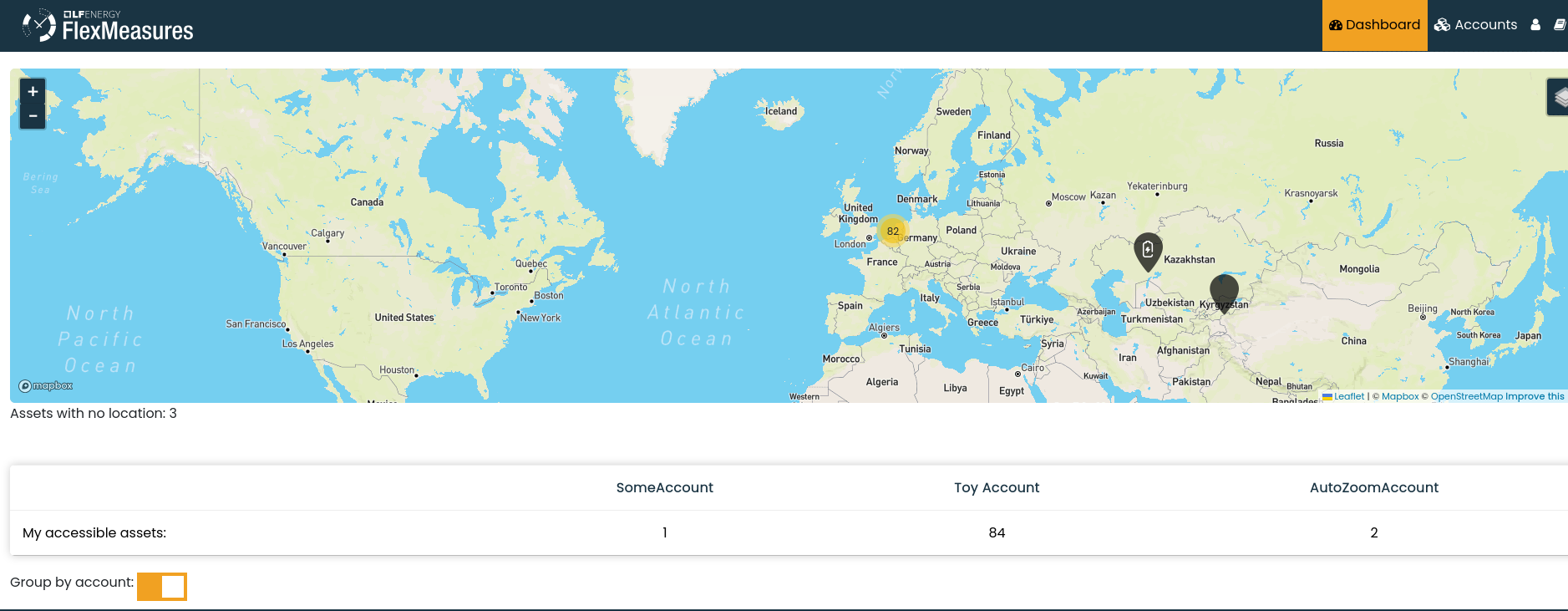
We made the dashboard more useful for users who have access to several accounts. This is true for admins but also consultants. Admins saw a list of all possible accounts, consultants saw only their own assets.
- Consultants see their client accounts below the map, and the assets can be filtered by those.
- Admins see only accounts that are not "end-nodes", i.e. clients - only consultants.
This work was done in Pull Request 1763.